Editing
Nylon in IntelliJ works the way other languages do there: errors as you type, completion, and the usual ways to get around.
Errors as you type
The compiler checks your code as you write it. A problem is underlined where it is, and hovering over it says what's wrong, in the same words a build would use.
Completion
Start typing and IntelliJ offers the names that fit: your own declarations, the libraries' and the language's keywords. Each suggestion has an icon that says what it is, and its declaration beside it:
| Icon | What it is |
|---|---|
v | A value: a let or var with no parameters |
f | A function, entry points included |
p | A property: a value that belongs to a class |
m | A method: a function that belongs to a class, constructors included |
Classes, traits, structs and objects have icons of their own. The same icons appear in the Structure window and the navigation bar.
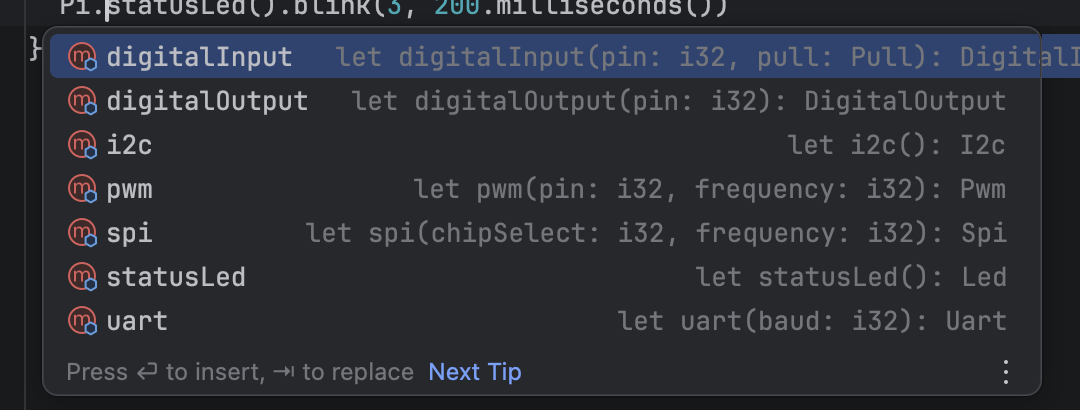
As you type a call, IntelliJ shows the function's parameters. In the editor, light grey hints show the types it has worked out and the names of the parameters you're passing.
Documentation on hover
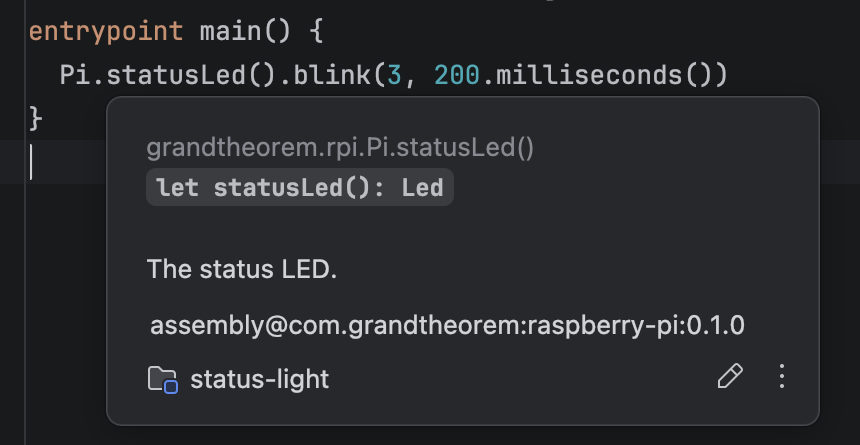
Hover over a name to see its declaration, where it comes from, and its documentation comment: the ## lines above
it. It works for the libraries' declarations as well as your own.
Getting around
- Go to declaration: Cmd-click (Ctrl-click on Windows and Linux) a name to jump to where it's declared.
- Find usages: right-click a name and choose Find Usages to see everywhere it's used.
- Rename: Shift+F6 renames a name everywhere it's used.
- The Structure window lists the declarations in the file you're in.
- The navigation bar and breadcrumbs show where you are: the namespace, the class and the function.
- Go to Class and Go to Symbol find a declaration anywhere in the project by its name.
Writing faster
- Implement members writes the members a trait asks for, ready to fill in.
- Import fixes a name that isn't imported yet: press Alt+Enter (Option+Enter on a Mac) on it.
- New | Nylon File in the project view makes a file with its namespace already written, as an empty file, a class, a trait or an entry point.
- Reformat Code fixes indentation and spacing, and never moves code onto another line.